Appearance
Dynamic segments
Segments are rule-based audiences. Instead of tagging players by hand, an operator describes who belongs — "players from Germany who deposited more than $100" — and the platform keeps that group up to date as people qualify or fall out. Segments feed targeting for bonuses and campaigns, and they update in response to real events rather than an overnight batch.
The segment tools live at /segments in the admin panel.
The segment list
The list shows the dynamic segments that exist, each with its id, name, a color used to recognize it at a glance, and a live count of the players inside it.
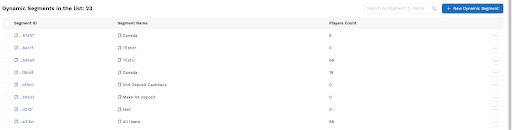
A search box filters by name, and the count moves on its own as players qualify, so a segment that's growing is visible at a glance.
Creating a segment
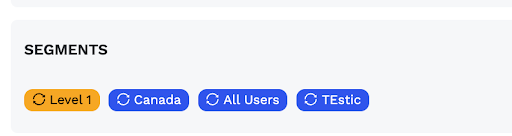
A segment needs a name and a color; the color is purely for recognition in lists and on player profiles. Description and status are optional, though status matters in practice — an inactive segment stops taking on new players.
Defining the rules
The rule builder is where a segment gets its meaning. Conditions are grouped, and you choose how they combine: conditions within a group join with AND or OR, and groups themselves combine with AND or OR at the top. That two-level structure is enough to express things like "(German OR Austrian) AND has deposited."
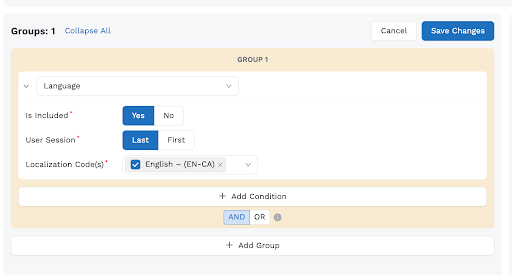
Each condition is built on a trigger — a player attribute or a computed metric. The available triggers cover identity, money, and behavior:
| Trigger | Shape | What it matches |
|---|---|---|
| Language, country | Pick from a list | Locale or country |
| Registration date | Date range | When they signed up |
| Loyalty level, VIP status | Pick from a list | Program standing |
| Currency | Pick from a list | Wallet currencies held |
| Partner id, first game, active bonus | Pick from a list | Attribution and activity |
| Deposit sum, deposit count, average deposit | Numeric range | Deposit behavior (USD) |
| Balance, in-out, GGR, NGR, RTP | Numeric range | Financial position (USD / %) |
| Duplicate, has PWA, has free spins | Yes / no | Account flags |
| Email verified, phone verified | Yes / no | Verification state |
A couple of behaviors are worth knowing because they prevent surprises: a segment with no conditions matches nobody (it won't accidentally sweep in every player), and a trigger the engine doesn't recognize simply doesn't match.
The members list
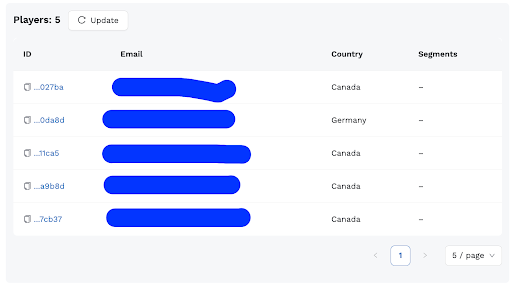
Opening a segment shows the players currently inside it, paged.
On an individual player's profile, the same membership appears on their Segments tab, marked dynamic when the rules put them there or manual when an operator did.
How membership stays current
This is the part that makes segments "dynamic." After meaningful lifecycle events the platform re-evaluates the affected player and adjusts their segments on the spot. Those events include registration, a completed deposit, a settled game session, the PWA flag being set, an admin editing the profile, and KYC approval.
The effect is that a player who newly qualifies shows up in the segment within seconds of the triggering action — no one has to press a button. Conversely, when a player no longer matches, the next reconciliation removes them, and if a dynamic segment is deleted, the memberships it created are cleaned up too.
Editing and recalculating
Two manual levers complement the automatic updates:
- Editing the rules of a live segment kicks off a background recalculation, so membership catches up with the new definition.
- Recalculate re-runs every player against a single segment on demand — useful after a bulk data change or when you want to be certain a count is fresh.
Both require players.edit; viewing a segment and its members only needs players.view.
Where it lives in the code
For anyone tracing behavior: the trigger catalog is in packages/shared/src/segments.ts, rule evaluation in packages/db/src/operations/segment/evaluate-logic.ts, membership in .../segment/membership.ts, and the lifecycle hooks in packages/wallet/src/segment-engine.ts. The admin screens are under apps/admin/app/segments/.